
For players comparing mobile casino options, the key question is not simply whether a site opens on a phone. It is whether the layout, game selection, account tools and payment information remain usable on a smaller screen. The betninja casino app is best understood as browser-based mobile access rather than a confirmed native application for Canada. This guide explains what that means in practice, how to assess the mobile lobby, and which account, payment and responsible-gambling details deserve attention before using real money.
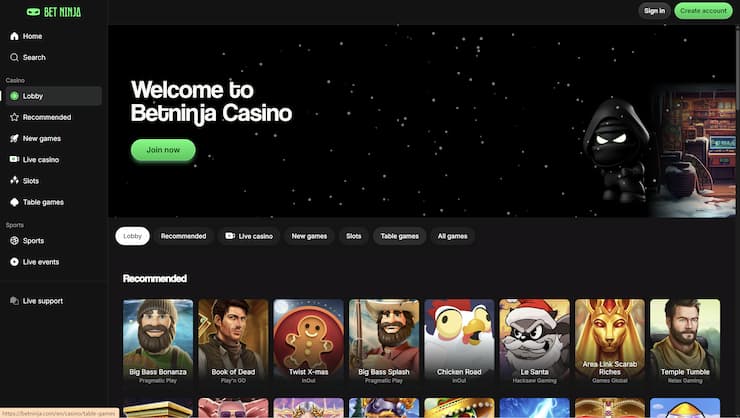
How Betninja mobile access works
Betninja is described in Canadian-facing material as a responsive website that runs through an iOS or Android browser. Instead of downloading a dedicated native application, a player opens the site in a mobile browser and uses the casino lobby, live casino, sportsbook, cashier, account settings and support tools there. Games launch directly within the browser, so the experience depends partly on the phone, browser and connection being used.
The same account is used across the casino and sportsbook, with the balance and account information shared between desktop and mobile access. That can be convenient for someone who moves between devices, because mobile play does not require a separate profile. It also means that account security matters across every device. Players should avoid saving credentials on shared phones and should check that the address bar shows the intended site before entering personal information.
Mobile access should not be confused with confirmation of a downloadable app. The available material consistently describes browser use and does not list a dedicated Betninja native app for Canada. A browser-based site can still provide the necessary functions, but users should be cautious about unofficial app files or third-party download pages. The operator’s current website and support channels are the safer reference for any software announcement.
Finding suitable games on a smaller screen
The catalogue is generally reported to contain more than 2,000 games from over 20 studios, although the exact selection can depend on location and account settings. Categories include slots, jackpots, table games, live casino, roulette, blackjack, baccarat, poker and video poker. Crash, instant-win and game-show titles are also commonly listed, giving mobile players several formats beyond conventional reels.
Searching is particularly important on a phone, where scrolling through a large lobby can become frustrating. The mobile interface is described as offering game-name and provider searches, along with sections such as Recommended, New Games and Table Game. Provider filters can help narrow the choice to studios such as Pragmatic Play, Play’n GO, Evolution, Ezugi, Hacksaw Gaming, Relax Gaming or Games Global.
Before selecting a title, check its rules, pay information and any displayed wagering or eligibility conditions. Commonly named examples include Gates of Olympus, Big Bass Bonanza, Book of Dead, The Dog House and Sweet Bonanza, but availability is not guaranteed for every account. Some reviews report that demo play is not consistently available, so a player may need to avoid opening an unfamiliar game with real funds simply to test its controls.
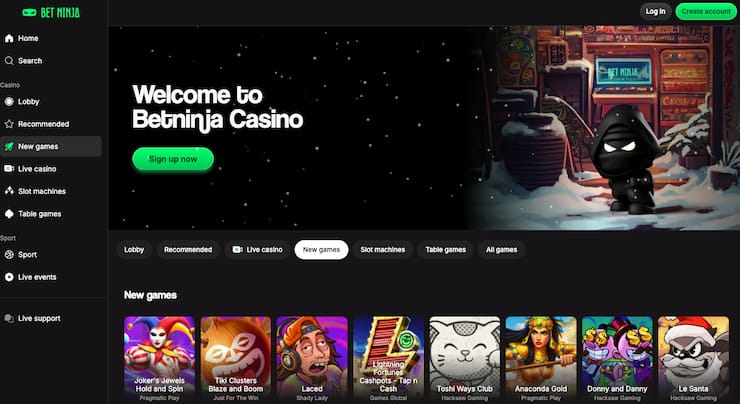
Checking performance before playing
A responsive layout should make basic navigation readable without excessive zooming. On a phone, look for clearly labelled menus, stable game loading and controls that remain visible when the device is held vertically. Live casino tables may require more screen space than slots, while game-show interfaces can contain several buttons or panels. A short, low-risk inspection of the lobby can reveal whether the format feels manageable.
Connection quality also affects the experience. Mobile data interruptions, weak Wi-Fi or a browser running many background tabs can cause delays, disconnections or repeated loading. These issues do not demonstrate that a game is unfair, nor can a brief session establish its return-to-player rate or volatility. Those characteristics should be checked in the game information and rules, not inferred from a few results.
Before committing funds, review whether the selected title has clear rules, visible stake controls and an understandable balance display. Keep the first session separate from assumptions about winning or income: casino outcomes remain uncertain. If a game does not display properly, close it and contact support rather than repeatedly refreshing or increasing the stake. A phone’s convenience should not encourage faster decisions than a player can comfortably evaluate.
Using cashier and account tools on mobile
The mobile browser version is described as providing quick access to the cashier, account settings and support. Canadian-facing sources commonly mention Interac, Visa, Mastercard, MiFinity, Apple Pay, Google Pay and cryptocurrencies, but availability can vary by location, currency, method and account settings. The cashier shown after signing in is the practical reference, not a general list of methods found in a review.
Deposit and withdrawal conditions deserve equal attention. Deposits are often described as being processed quickly after approval, while withdrawal timing varies by method. Reported ranges include 0–24 hours for some cryptocurrency payouts, roughly 48–72 hours for certain e-wallet withdrawals and one to three banking days for Interac or bank-linked methods. These are reported ranges rather than guarantees, and banking, conversion or network charges may apply.
Read the amount, fee and minimum shown immediately before confirming a transaction. Canadian-facing material commonly reports minimum withdrawals around EUR100 or approximately C$135–150, but the cashier sets the applicable threshold. Deposited funds may also need to be wagered once before withdrawal. Since verification can be required before a first payout, keep registration information accurate and follow the operator’s stated document requirements if a check is requested.
Managing safety and account controls
Mobile convenience makes account controls especially important because play can happen almost anywhere. The available material describes deposit limits and self-exclusion as responsible-gambling tools, often activated by contacting support rather than through a completely automated dashboard. A deposit limit can prevent further deposits after the chosen threshold, while self-exclusion disables access for the selected or stated period.
Support is commonly listed as available through 24/7 live chat, with email assistance also reported and English and French support mentioned in Canadian-facing reviews. Support can handle questions about payments, verification, login problems, bonuses, account closure and responsible gambling. No consistent phone-support channel is identified, so players should use the available written channels and retain relevant payment or account correspondence.
There is also an important regulatory distinction for readers in Ontario: the source material says Betninja is not listed in iGaming Ontario’s regulated-operator directory and is outside that locally regulated private market. That does not establish availability or suitability for every reader elsewhere. Check the rules that apply in your province, confirm the operator’s current terms, and never treat mobile access as proof of licensing, guaranteed withdrawals or personal affordability.
FAQ
Is Betninja available as a native mobile app in Canada?
Available Canadian-facing information describes a responsive website for iOS and Android browsers rather than a confirmed dedicated native app. The browser version is reported to provide casino, sportsbook, cashier, account and support functions. Avoid unofficial download files, and rely on the operator’s current website for any later app announcement.
Can I use the same account on mobile and desktop?
Yes, the source material describes one account covering casino and sportsbook access, with the same balance used across devices. Mobile and desktop games open through the browser. Protect login details on shared devices, and contact support through the registered account channels if access or verification problems occur.
What should I check before making a mobile withdrawal?
Review the cashier’s current minimum, available methods, displayed fees, processing information and any turnover requirement. A first withdrawal may also require identity verification. Reported times differ by method and are not guarantees, so confirm the exact conditions shown for your account before submitting a request.